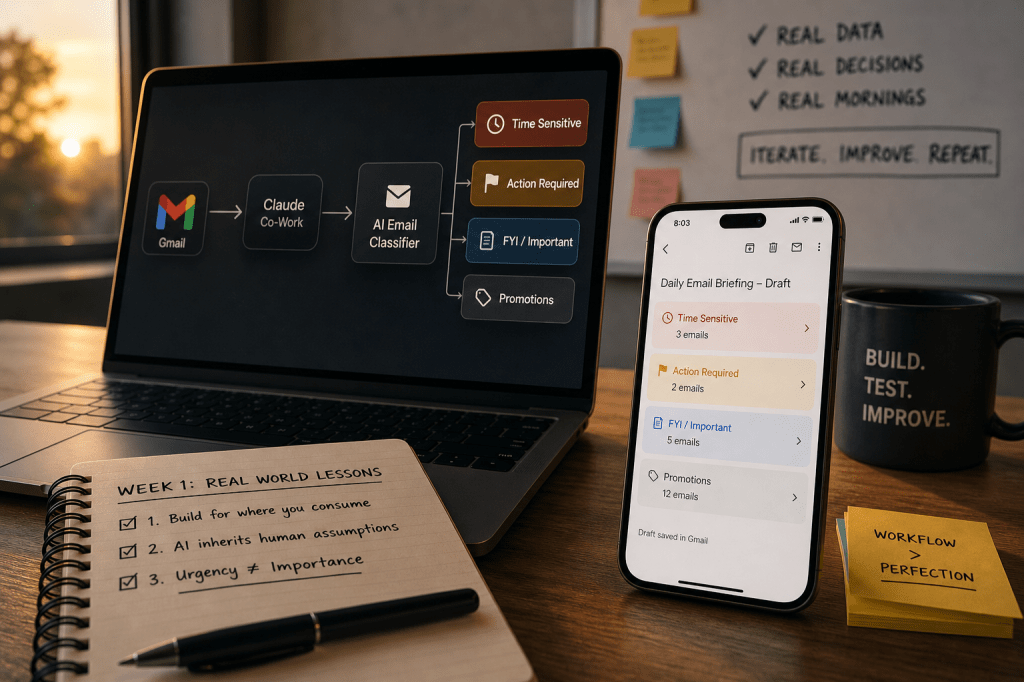
Last Monday I walked you through the AI workflow tool landscape and then showed you how to build a daily AI email briefing from scratch using Claude Cowork and Gmail MCP and the Vibe Management Framework.
I built an AI email classifier using the same tools to give me a brief of my emails from my personal mailbox every morning at 8am.
This was not just a content experiment but also, something I needed because like many of us the mailbox gets filled with promotional spam emails & at times you miss some important mails so getting a brief highlighting action required mails made it easier to focus & action those.
Building it took one afternoon. Making it actually useful took a full week. Because building an AI workflow is one thing. Making it reliable in the real world is something else entirely.
Here is what actually happened when I ran it.
Learning 1: I Built for Desktop. My Mornings Happen on Mobile
Co-Work is a desktop app. The scheduled task runs on my system. Every morning at 8am, like clockwork, the brief generates perfectly.
But I am not at my system at 8am.
Like most people, I check email on my phone while waking up, not while sitting at a desk. And unfortunately, Claude Co-Work tasks are still not accessible on mobile.
So the brief was running perfectly and I was not reading it. Brilliant.
The fix was straightforward.
I went back into the prompt and updated it to draft the output directly to my own Gmail inbox instead of just displaying it in Co-Work.
Now every morning before I get out of bed, there is a draft sitting in my Gmail. Categorised by priority. Time-sensitive flags at the top. Action items clearly listed. Everything else below.
Claude cannot send emails yet which is a deliberate safety boundary Anthropic has set. But a draft sitting in my inbox is close enough.
Lesson I should have remembered before I started:
Build on your most capable device, design for where you will actually consume it. They are rarely the same place.
Learning 2: AI Inherits Human Assumptions
On Tuesday two auto-debit transactions went out. Vendor B failed. My bank sent a failure notification but no vendor name in the message, just a transaction amount and a failure code.
Next morning Claude flagged Vendor A’s payment as failed and needing action. Vendor A had already gone through fine.
Here is the part that got me. When I saw that bank notification on Tuesday evening I had made the exact same wrong assumption myself. I had to open my transaction history and manually check before I knew which vendor had actually failed.
Claude connected the wrong dots. The same wrong dots I had connected. Just without the ability to go verify.
Two lines added to the brief fixed it:
- First: Only reference a vendor in bank transaction emails if one is explicitly named in the message.
- Second: Never infer connections between separate emails even if they arrive close together or involve similar amounts.
Generated the brief again. Corrected. But think about what this means at scale.
A finance team deploying a classifier across thousands of transactions a day, inheriting the same assumption, is not dealing with a minor inconvenience.
That is an audit risk. Wrong escalations. Double entries. Payments flagged to the wrong accounts.
The AI did not create a new failure mode. It inherited a human one and ran it at volume. That is the thing to watch for when you build.
Learning 3: When “Urgent” Emails Were Actually a Waste of Time
My “time-sensitive” section started becoming useless. The brief was flagging promotional emails in the time-sensitive category. Technically correct — “Offer ends tonight”, “Last chance”, “48 hours only.” These emails use urgency language so the classifier treated them as urgent.
But this defeated the purpose of having a prioritised briefing in the first place.
The fix was a single instruction added to the prompt:
Each email must appear in exactly one category, and promotional emails stay promotional regardless of any urgency language used. No exceptions.
Brief updated. Problem solved.
But the fact is I would not have caught this without actually running this for a few days.
Clean Test Data Lies
No amount of testing in setup would have caught it because I would have used test emails, not the avalanche of flash sale notifications my inbox actually receives.
This is a same problem enterprises faces too.
The experiments on the clean test data do not cover all edge cases & than when this hits production we see high failure rates.
You cannot fully design a solution before you run it which means the brief is never truly finished.
Week 1 is the most valuable testing environment you will ever have, because you are running it on real data, real decisions, real mornings.
And that is exactly where the gaps show up.
Where week 2 goes
Three fixes in. Brief is sharper than day one. The next experiment is expanding this workflow across multiple inboxes using n8n.
For me, that means pulling from four separate mailboxes across different domains into one.
Next week I will share what happens when you move from agentic desktops, which are efficient but limited, into automation platforms that allow deeper orchestration.
Like I said last week: The tools are available. The barrier is no longer technical. It is deciding to start.
You do not need to be technical to start. You only need a workflow worth improving.
Found this useful? I will continue sharing practical strategies for operationalising AI in future editions of The Abhay Perspective. Subscribe below and to my LinkedIn newsletter for future updates.
If you want to explore how any of this applies to your context, let’s talk. https://theabhayperspective.com/work-with-me/

 The Abhay Perspective
Leave a comment